
Which tool fits the way you create?
When you compare Keyframe Video with OpusClip, start with the work you want to finish. Finding an excerpt is only the first step. You still need to check the words, explain the context, make the video readable on a phone, and export something you are happy to publish.
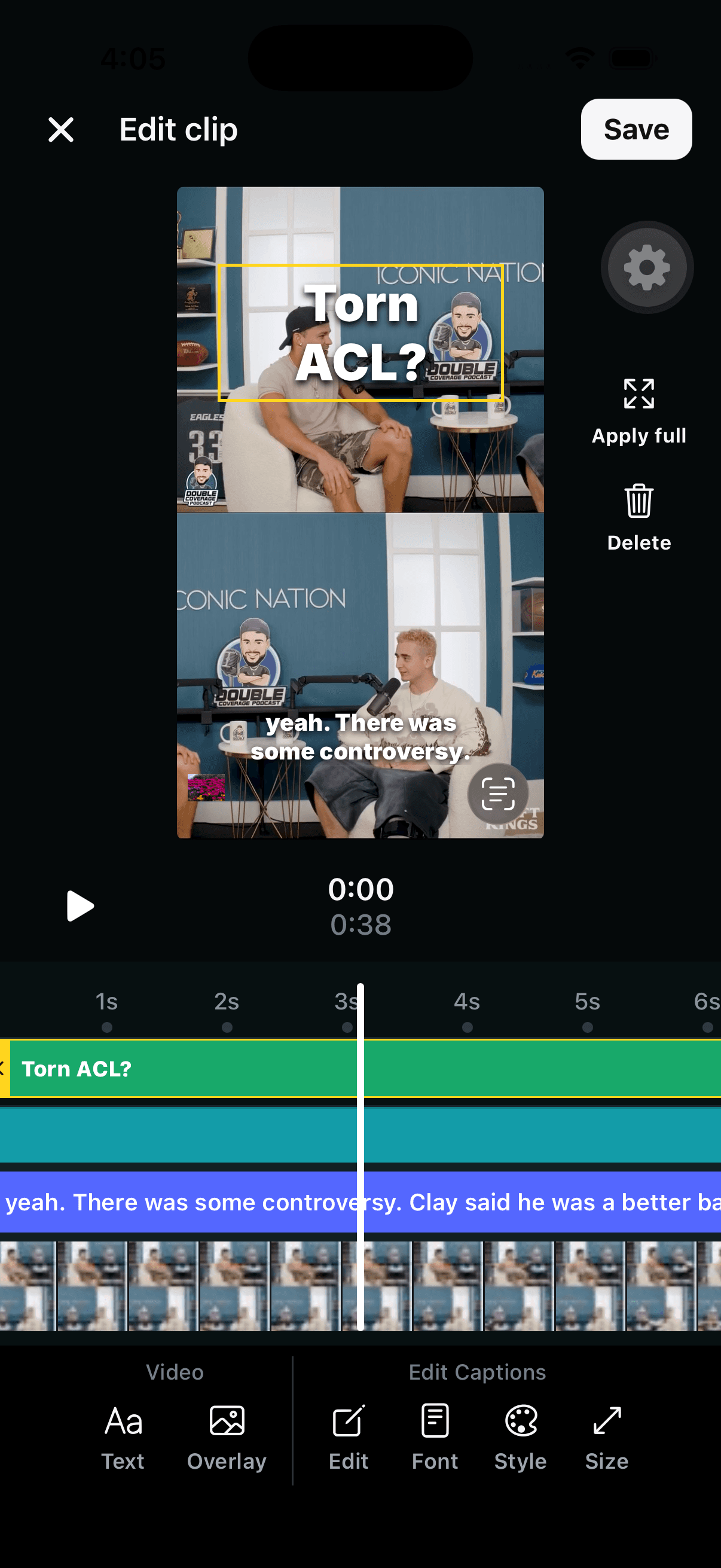
Keyframe brings that workflow to the browser, iPhone and iPad: generate short clips from a longer video, review the candidates, and open a selected clip in the editor. Its caption tools and text and image overlays let you shape the result before export. You can also start with a video you have already selected and use the Video Captions workflow.
Written by the Keyframe team. Product information reviewed October 12, 2026. This is a feature and workflow comparison, not a controlled speed or quality benchmark.
Keyframe and OpusClip at a glance
| Task | Keyframe Video | OpusClip |
|---|---|---|
| Find excerpts | AI Clips generates candidates from longer videos. | AI clipping turns longer videos into excerpts. |
| Edit on your phone | Browser, iPhone and iPad editors with captions, text, and image overlays. | Mobile app with caption and transcript editing. |
| Style captions | Caption text, font, style, and size controls. | Caption fonts, colors, and styles. |
| Finish and share | Preview, export, and share a clip from the app. | Mobile saving/sharing; web tools also include scheduling and publishing. |
OpusClip details come from its mobile product page and editor overview. Platform and plan availability can differ; check the current product before subscribing.
What you can do in Keyframe’s editor
Correct the words. A name, number, or technical term can change the meaning of a clip. Review the transcript against the audio, then use the caption editing controls to fix it. Our caption editing guide walks through a practical review.
Give captions a consistent look. Use the Font, Style, and Size controls to create text that reads clearly over your footage. Check a bright scene and a dark scene before deciding on a treatment.
Add a text overlay. A short heading can explain the topic before the spoken answer gets there. For example, a hypothetical interview about planning could open with “The first question to ask.” Keep that heading separate from the spoken captions so you can review each element clearly.
Add an image overlay. Use an image to support the moment: a relevant visual, a logo you own, or a detail the speaker mentions. Preview its placement so it does not cover a face or the captions.
Review before export. The editor’s preview and timeline help you inspect the finished composition. Save your edits, return to the clip preview, and export or share when it is ready. The Keyframe App Store listing also describes its clip previews, editor, caption styling, and overlays.
When to choose each
Keyframe is worth trying when your workflow centers on iPhone or iPad and you want to move from AI-selected moments to hands-on caption and overlay editing. It is especially relevant when you review and finish posts on the same device you use to share them.
OpusClip is worth evaluating if you need a broader browser-based workflow. Its published editor offering includes text-based and timeline editing, AI B-roll, and social scheduling. Those needs may matter more to your decision than the appearance of a single generated clip. Mobile availability alone does not distinguish the two products.
For either app, compare the actual purchase terms against how often you create. Keyframe is free to download with in-app purchases; see our plans and credits. Avoid comparing a weekly subscription with an annual-plan monthly equivalent as if they were the same commitment.
A useful way to compare them yourself
- Use the same recording you own or have permission to edit.
- Choose one complete answer that you would actually post.
- Check whether the selected excerpt preserves the speaker’s meaning.
- Correct a name, style the captions, and add a relevant heading or visual.
- Watch each exported result on your phone. Compare readability, framing, and the work it took to finish.
The best fit is the tool that helps you repeatedly finish the work you need. Start with a podcast clipping workflow if a long interview is your next project.